Craftideas.info - Free Crafts, Tutorials and Patterns for all Seasons


Custom Search


 Home

Spring & Easter Crafts

Summer Crafts

 Autumn Crafts

Christmas & Winter Crafts

 Paper Crafts

 Wood Crafts

 General Crafts

 Kids Crafts

 Fabric & Sewing Crafts

 Greeting & Birthday Cards

 Craft Patterns

 Craft Tutorials 1

  Craft Tutorials 2

 Jewelry Crafts

 Craft Recipes

 Felt Crafts

 Paper Craft Tips

 Tags

 ATC

 Kids Rainy Day Crafts

 Recycling Crafts

Newsletter

 Picture Gallery

  Contact

 Sitemap

 Links


Vintage Card

Craft a Pisa Card

Eyelets

Papers for Cards and Scrapbooks

How to use Corner Punches

Step-by-Step Card Craft Tutorial

Cuttlebug Embossing and Die Cutting Machine 2

Cuttlebug Embossing and Die Cutting Machine

Double Do® XL with Cuttlebug Embossing Folders

Stitching on Cards

Paper Napkin Applique/ Fusible Web

Double Do® XL with Double Do® Die Cuts

Fiskars 3 in 1 Corner Punches

Fiskars Shape Boss©

Cute Primitive Cow Card Tutorial

Spooky Halloween Card

How to Use the Sizzix Sidekick

Sunflower Card Craft Tutorial

Adhesive Foils and 3-D Pads

Special Effects for Cards

Double Do® XL Tutorial

How to Chalk Paper

Embossing

Add Texture to your Paper Projects

Tips for Card Making and Paper Crafts


Tutorial - Adding Texture to Your Paper Craft Projects

All patterns, pictures and text found on Craftideas.info are property of this website and may be only printed out and used for private or non-commercial purposes. It is not permitted to use them on the internet or in any other publication.


Whether you create cards, scrapbooks, tags, ATM’s or general paper craft projects, you can add more excitement to your these projects by using textured or embossed paper or cardstock. Whether used as a background or as decorative elements, these can give your artwork a touch of elegance and a new dimension. But buying these types specialty papers or cardstock at a stationary store or a craft store can be quite expensive, especially if you do a lot of crafting. There are a few helpful products on the market that enable you to create your own textures.

Supplies needed: This page shows two different possiblities. You will either need Fiskars® Texture Plates™ with an embossing tool or stylus.... OR a light box, brass embossing plates with small designs and a stylus tool.


Adding Texture to Paper 1

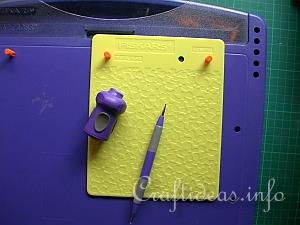
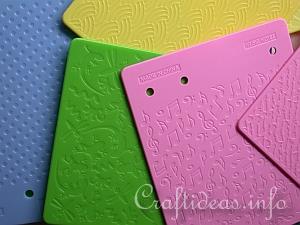
1. This is how the Fiskars® Texture Plates ™ look like. Each plate has a design on both sides. There are many textures to choose from and they are normally sold in packs.

Adding Texture to Paper 6

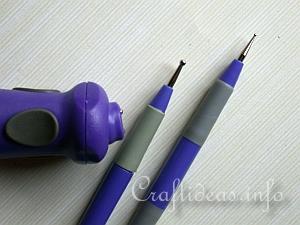
2. These are the embossing tools. The stylus is available in different sized ball heads and the embossing tool is a practical device. When your paper is covering the texture plate, it is often difficult to indicate where the lines are. More about the tool in step 4.

Adding Texture to Paper 2

3. The Shape Boss from Fiskars is useful for holding the texture plates in place. Insert the pegs in the designated holes to stabilize the position of the texture plate.

Adding Texture to Paper 3

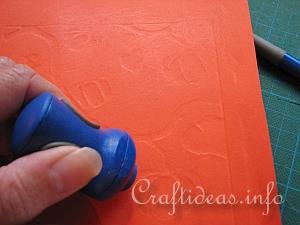
4. The first thing you want to do is to use masking tape and stick your paper (with the right side or good side down) to the plate. Use your embossing tool or you can even use a stylus (this will take a bit longer) and work in a circular motion until you begin to see your pattern.

Adding Texture to Paper 4

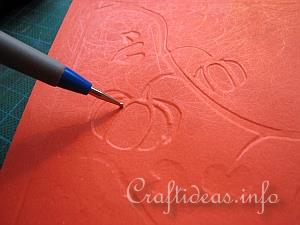
5. Continue until you can see your pattern. At this point, you will now want to take the stylus and trace around the lines again to deepen the motif.

Adding Texture to Paper 5

6. Remove the masking tape and turn your paper or cardstock over. You will now have a paper with a raised or “embossed” pattern.


Light Box and Metal Embossing Plates


Embossing with the Light Box 1

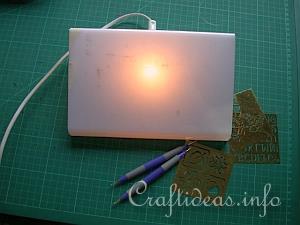
7. You can also create a wonderful texture using brass embossing templates with small designs and a light box.

Embossing with the Light Box 2

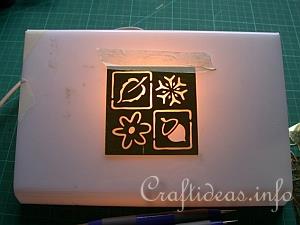
8. Stick your template to the light box using masking tape.

Embossing with the Light Box 3

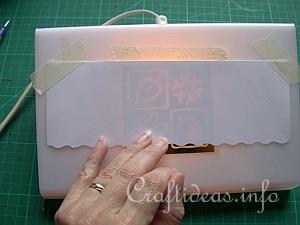
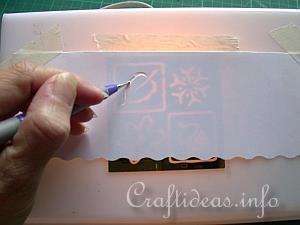
9.Place your paper over the template and secure it also with masking tape. Take your stylus and follow the pattern along the edges. This will push the paper to the inside (which will raise it on the other side).

Embossing with the Light Box 5

10. Follow along all of the edges until the pattern is completed.

Embossing with the Light Box 6

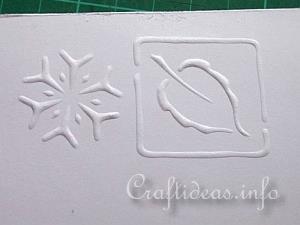
11. Remove your paper from the light box and  turn it over. You now have an embossed and textured paper that can be used for any of your crafting purposes. Learn more about embossing with a light box and brass stencils


Embossing Machines

Cuttlebug Embossing with Embossing Folders

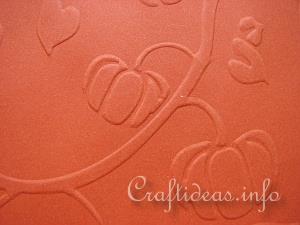
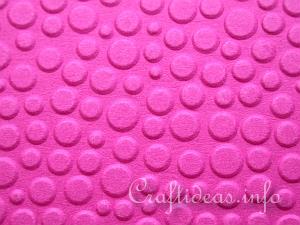
12. You will currently find different embossing machines in craft stores. Although each different in its unique way, you can use these machine to also emboss paper. The pattern above was created with the Cuttlebug. More about the Cuttlebug can be found here >>> Cuttlebug and Embossing Folders Tutorial


Custom Search


Copyright Craftideas.info